
Since many major companies see ‘Work From Home’ as a viable long term plan, there is a need to understand the commonly practiced bad postures at home while working on computers, which can lead to muscle spasm or stiffness and back and neck pain in a long run with many associated health issues.
Ergonomics
Proper Ergonomic design is necessary to prevent Repeatitive Strain Injury which can develop overtime & can lead to long term disability associated with many musculoskeletal disorder or headache due to eye strain or of cervicogenic origin.
Ergonomic is nothing but applying correct biomechanical strategy in day to day activities.
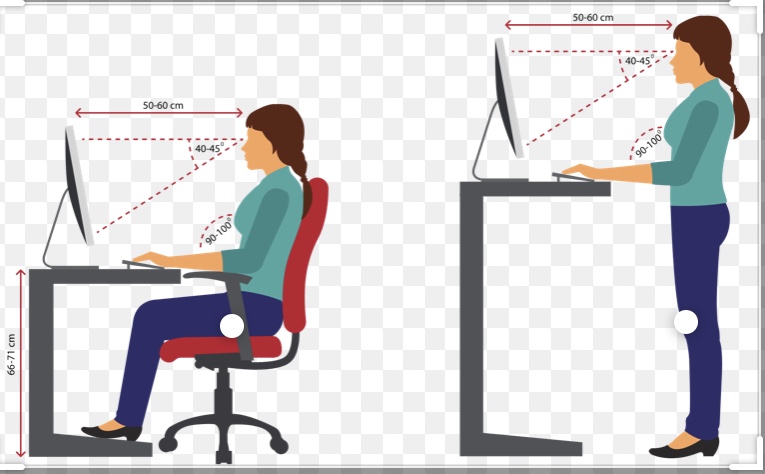
Start with the desk
Slouching on the couch or bed while working on a laptop should be a big no no.
While using a real desk makes it easier to build friendly work from home environment but also dinning table, foldable tables or anything which doesn’t compromise your posture is a good alternative.
Using a small cushion to support your lumber curve while sitting is quite beneficial.Adjust backrest angle to comfort(90-110 degrees).
Seat height adjustment
Adjust chair height so that elbow is level with desk height( 90 degree angle at the elbow), wrist is in a neutral posture, shoulder and arms are relaxed and close to the body.
Even a simple chair’s height can be adjusted using cushion or pillow since height adjustable chair’s availability could be a challenge at home.
Avoid elevated or hunched shoulder. Avoid forward/backward/upward reaching.
A footrest is often very useful in prolonged sitting.
Laptop Use
Risk results from inability to adjust screen, keyboard & mouse separately.
Using an external mouse and keyboard along with a laptop stand to raise the height appropriately is highly recommended.
Keyboard &Mouse placement
Move your chair close to the work surface to minimize forward bending. Consider shorter keyboard to keep the right hand close to the body.
Use of a low profile regular mouse can minimize upward bending of the wrist. Person with pre existing wrist injuries or pain may find a Vertical Mouse useful to minimize discomfort.
Monitor Placement
Monitor should be approximately an arms length away, top of the screen should be just below the eye-line.
Avoid positions causing awkward neck posture and neck stiffness or pain. Consider dedicated computer glasses.
Glare control
Avoid placing monitor in front of windows or facing window. Consider anti-glare filters, adjust brightness & contrast setting for comfort.
20-20-20 rule
Every 20 minutes, look at something 20 feet away for 20 minutes.
“Neither sitting nor standing, it’s the movement that helps maintaining and improving the health”
Vary tasks to enable changes between sitting and standing.
Calls can be attended while walking around the room.
Stretch in between the tasks.
Remember that when your are healthy, mentally and physically, for a long term period you’re gonna be an even better and efficient employee for the company.
Stretching and Strengthening goes hand in hand in maintaining and improving the musculoskeletal system. Every day a quick half an hour of simple workout session to start your day is the best practice in today’s world. While 5 minutes of simple breathing exercise is a great way to strengthen you lungs as well as for improving concentration.
 In House Fitness